
Repeater
The Repeater controller allows users to structure a replicable group of controls.
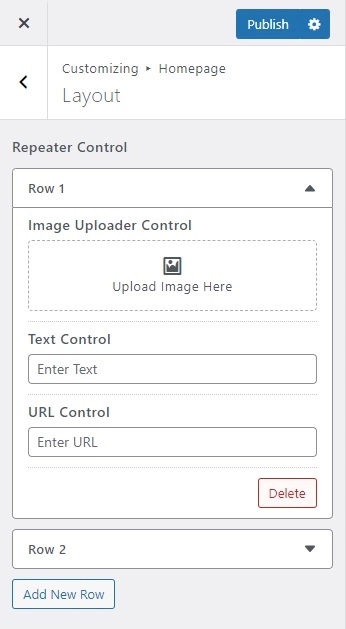
Demonstration
Handy::control( 'repeater', [
    'id'          => 'repeater_id',
    'section'     => 'layout_section',
    'label'       => esc_html__( 'Repeater Control', 'textdomain' ),
    'description' => esc_html__( 'Description Here', 'textdomain' ),
    'priority'    => 1,
    'controls'    => [
        'image_id' => [
            'type'        => 'image-uploader',
            'label'       => 'Image Uploader Control',
            'placeholder' => 'Upload Image Here',
        ],
        'text_id'  => [
            'type'        => 'text',
            'label'       => 'Text Control',
            'placeholder' => 'Enter Text',
        ],
        'url_id'   => [
            'type'        => 'url',
            'label' 	  => 'URL Control',
            'placeholder' => 'Enter URL',
        ],
    ]
]);
TIP
Here's an example using the default, maximum, row_label, add_button and delete_button parameters. Note the default value will be depending on the type of control defined in controls. And the maximum value accepts an integer data type that is used as maximum or limit of items. And the row_label value accepts a string data type that is used as row or item label. And the add_button value accepts a string data type that is used as add button label. While the delete_button value accepts a string data type that is used as delete button label.
Handy::control( 'repeater', [
    'id'          => 'repeater_id',
    'section'     => 'layout_section',
    'label'       => esc_html__( 'Repeater Control', 'textdomain' ),
    'description' => esc_html__( 'Description Here', 'textdomain' ),
    'row_label'   => esc_html__( 'Row', 'textdomain' ),
    'add_button'  => esc_html__( 'Add New Row', 'textdomain' ),
    'delete_button' => esc_html__( 'Delete', 'textdomain' ),
    'priority'    => 1,
    'maximum'     => 5,
    'controls'    => [
        'image_id' => [
            'type'        => 'image-uploader',
            'default'     => 100,
            'label'       => 'Image Uploader Control',
            'placeholder' => 'Upload Image Here',
        ],
        'text_id'  => [
            'type'        => 'text',
            'default'     => 'Content…',
            'label'       => 'Text Control',
            'placeholder' => 'Enter Text',
        ],
        'url_id'   => [
            'type'        => 'url',
            'default'     => 'https://www.google.com',
            'label' 	  => 'URL Control',
            'placeholder' => 'Enter URL',
        ],
    ]
]);
Supported Controls
Here is the list of the repeater's supported controls.
Audio Uploader
Alignment
Angle Picker
Button Set
Checkbox
Checkbox Multiple
Checkbox Pill
Code Editor
Color Picker
Color Set
Content Editor
Counter
Dashicons
Date Picker
Dimension
Dropdown Custom Post
Dropdown Page
Dropdown Post
Duotone
File Uploader
Image Checkbox
Image Radio
Image Uploader
Markup
Number
Radio
Range
Select
Size
Sortable
Switch
Tagging
Tagging Select
Text
Textarea
Time Picker
Toggle
URL
Video Uploader
Basic Usage
// Return an array.
$values = get_theme_mod( 'repeater_id' );
Parameters
| Name | Description |
|---|---|
| id |
The unique slug like string used as an ID and also as an index name in storing data in a database. |
| section |
The ID of the section in which the control will be displayed. |
| controls |
The array-based list of predetermined fields or controls. |
| maximum |
The repeater's total maximum or limit of items. Default |
| row_label |
The repeater's row or item label. Default |
| add_button |
The repeater's add button label. Default |
| delete_button |
The repeater's delete button label. Default |
| label |
The label or title of the control to show in the UI. Default empty. |
| description |
The description of the control to show in the UI. Default empty. |
| priority |
The order of control appears in the section. Default |
| validations |
The set of validations used to validate the value of the control. For further details, read validations. Default empty. |
| active_callback |
A callback function that determines the visibility of a control, whether to show or hide depending on a condition. For further details, read active_callback. Default empty. |
| sanitize_callback |
A callback function that sanitizes the value of control before storing it in the database. Note that this is only optional since each control is already well sanitized. For further details, read sanitize_callback. Default empty. |