
File Uploader
The File Uploader controller allows users to choose a file from the WordPress Media Library.
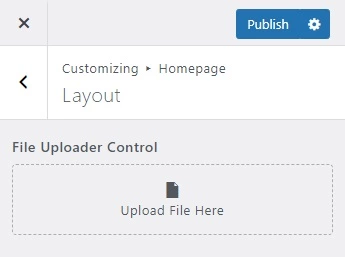
Demonstration
Handy::control( 'file-uploader', [
    'id'          => 'file_uploader_id',
    'section'     => 'layout_section',
    'label'       => esc_html__( 'File Uploader Control', 'textdomain' ),
    'description' => esc_html__( 'Description Here', 'textdomain' ),
    'placeholder' => esc_html__( 'Upload File Here', 'textdomain' ),
    'priority'    => 1
]);
TIP
Here's an example using the default parameter. Note the default value accepts only an attachment ID.
Handy::control( 'file-uploader', [
    'id'          => 'file_uploader_id',
    'section'     => 'layout_section',
    'default'     => 100,
    'label'       => esc_html__( 'File Uploader Control', 'textdomain' ),
    'description' => esc_html__( 'Description Here', 'textdomain' ),
    'placeholder' => esc_html__( 'Upload File Here', 'textdomain' ),
    'priority'    => 1
]);
TIP
Here's an example using extensions parameter. These are the list of allowed file extensions: pdf, doc, docx, ppt, pptx, pps, ppsx, odt, xls, xlsx and psd.
Handy::control( 'file-uploader', [
    'id'          => 'file_uploader_id',
    'section'     => 'layout_section',
    'default'     => 100,
    'label'       => esc_html__( 'File Uploader Control', 'textdomain' ),
    'description' => esc_html__( 'Description Here', 'textdomain' ),
    'placeholder' => esc_html__( 'Upload File Here', 'textdomain' ),
    'extensions'  => [ 'pdf', 'doc' ],
    'priority'    => 1
]);
Basic Usage
// Return the attachment id.
$value = get_theme_mod( 'file_uploader_id' );
Parameters
| Name | Description |
|---|---|
| id |
The unique slug like string used as an ID and also as an index name in storing data in a database. |
| section |
The ID of the section in which the control will be displayed. |
| default |
The predetermined value of the control. Accepts only an |
| extensions |
The defined file extensions that are allowed. Accepts only |
| label |
The label or title of the control to show in the UI. Default empty. |
| description |
The description of the control to show in the UI. Default empty. |
| placeholder |
The placeholder of the control to show in the UI. Default empty. |
| priority |
The order of control appears in the section. Default |
| validations |
The set of validations used to validate the value of the control. For further details, read validations. Default empty. |
| active_callback |
A callback function that determines the visibility of a control, whether to show or hide depending on a condition. For further details, read active_callback. Default empty. |
| sanitize_callback |
A callback function that sanitizes the value of control before storing it in the database. Note that this is only optional since each control is already well sanitized. For further details, read sanitize_callback. Default empty. |